Creating Schedules
Schedules let SnapFS run scans on a regular cadence.
Recurring schedules require a connected scanner agent. If you are only running one-off CLI scans, you can skip this page for now and return to it later after Installing an Agent.
Start Small
For beta, the safest approach is:
- create a schedule for a small root or subpath first
- confirm scan behavior
- then expand to a larger scope if the results look correct
Typical Choices
Useful starting points:
- hourly for a small active folder
- daily for a larger or quieter root
- manual runs for initial validation before creating a schedule
Existing Schedules
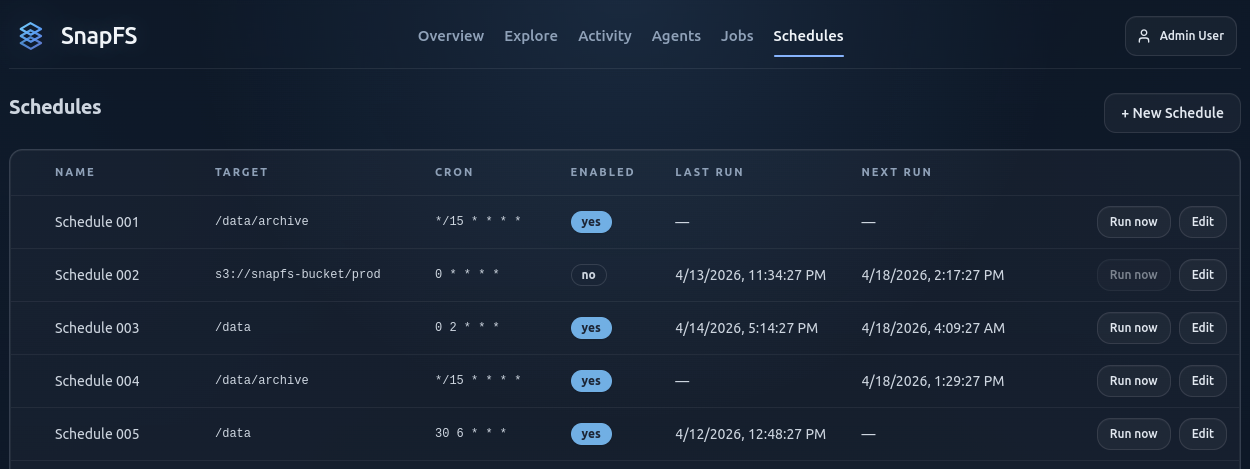
Use the Schedules page to review and manage recurring scans.
What To Enter
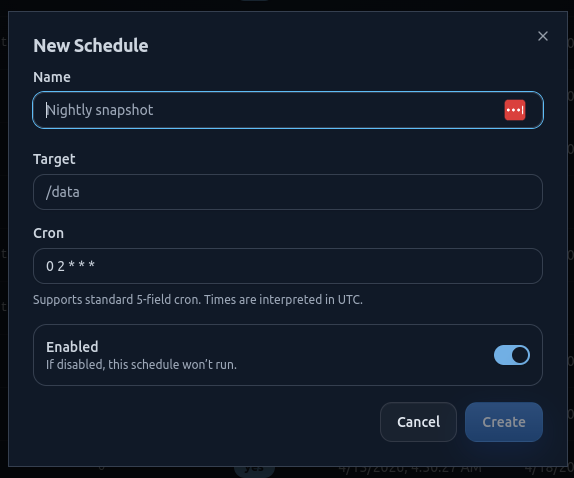
When creating a schedule, choose:
- a clear schedule name
- the target path to scan
- the run cadence
- whether the schedule is enabled
Schedules must stay within the root path configured for the connected agent.
Create A Schedule
The create flow should be straightforward: choose a name, target path, cadence, and whether the schedule starts enabled.
Good Beta Practice
If this is a very large environment, do not start with the full namespace. Validate one or two smaller roots first.
Next Step
Continue with Running Your First Scan.