Managing Access
Use the access controls in SnapFS to manage who can sign in and how automated clients authenticate.
Users
The Users area lets an administrator:
- review existing users
- create new users
- update user details
- manage roles and access status

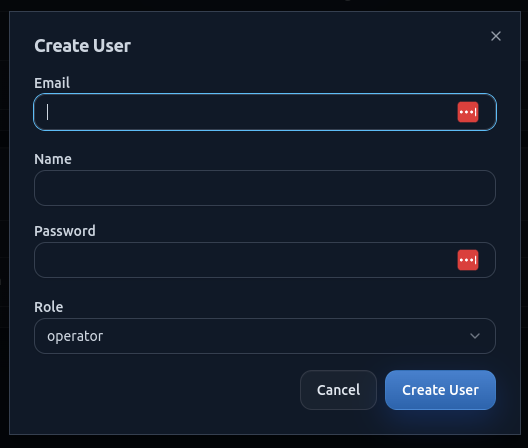
Create A User
When creating a user, provide:
- name
- email address
- role
- initial password
User Roles
SnapFS supports role-based access.
In beta, keep access simple:
- grant admin access only where needed
- use lower-privilege roles for normal users where possible
API Keys
API keys are intended for authenticated programmatic access.
Use them when you need:
- scripted access
- automation
- integrations that should not rely on an interactive login

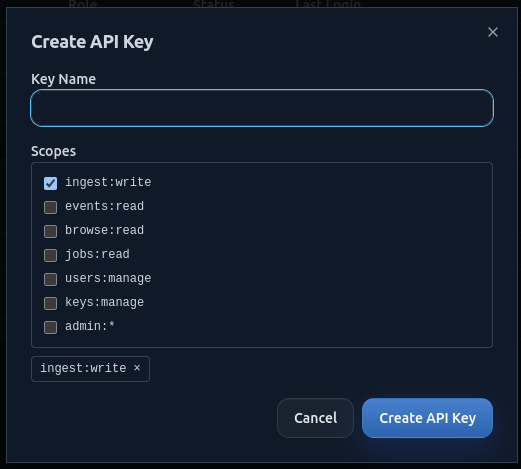
Create An API Key
When creating a key:
- give it a clear label
- store the raw key securely when it is shown
- rotate or revoke keys that are no longer needed
Good Beta Practice
For early beta users:
- create only the users you need
- use clear labels for keys
- prefer revoking unused keys quickly
- keep admin access limited
Troubleshooting
If a user cannot sign in or an API key does not work:
- confirm the account is active
- confirm the role has the expected privileges
- confirm the correct key is being used
- try generating a fresh key if needed