Installing an Agent
A SnapFS scanner agent is responsible for walking a filesystem root and publishing scan events.
Platform Support
Today, the supported packaged agent setup path is Linux.
On macOS, you can still run the agent directly after installing the package, but
the packaged Linux systemd setup does not apply.
Windows agent install guidance and install scripts are coming soon. If you are on Windows today, you can continue with one-off CLI scans, or you can wire up the agent manually if you are comfortable with a DIY setup.
Before You Install
Make sure you know:
- the gateway URL (e.g. https://example.snapfs.com)
- the root path you want this agent to scan (e.g.
/mnt/data) - API keys (see Managing Access)
Install The Agent
If you are installing the long-running agent service on Linux, the preferred flow is the bootstrap installer:
curl -fsSL https://raw.githubusercontent.com/snapfsio/snapfs/master/install.sh | bash
That bootstrap flow verifies python3, prepares the managed SnapFS runtime,
and then launches the Linux systemd installer for scanner-specific
configuration. The standard Linux bootstrap install includes xxhash support,
so the faster xxh64 hash algorithm is available during agent setup.
If you prefer to review the installer locally first, the repo-based fallback is:
git clone https://github.com/snapfsio/snapfs
cd snapfs
./install.sh
Advanced Install Options
If you need manual package or service-install options, see the SnapFS client docs:
During systemd setup, if you installed xxhash, consider setting the agent
hash algorithm to xxh64. You can also re-run the installer later with the
same scanner name to update the hash algorithm or worker count on an existing
agent.
Agent Root Paths
Each scanner agent has a configured root path.
Examples:
/mnt/projects/data/io
Schedules and manual scans should stay within that root.
Confirm The Agent Is Connected
After installation, open the console and check the Agents page.
You should see:
- the agent id
- connection status
- the configured root path
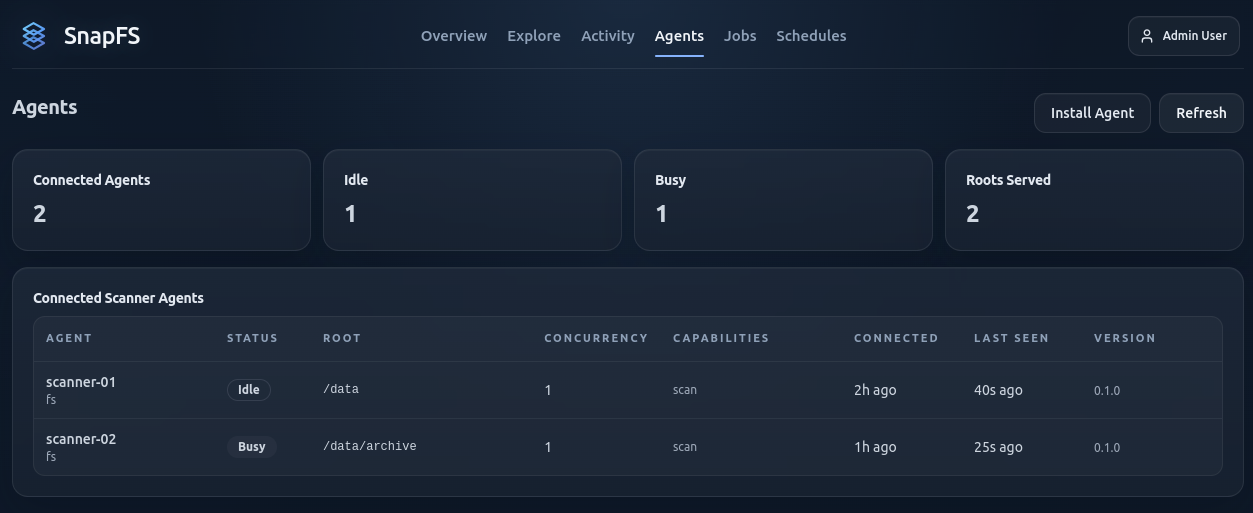
If the agent is connected and idle, you are ready to create a schedule.
Next Step
Continue with Creating Schedules.